
Let's Customize your AI assistant
Every real estate agent has a different style, market, and way of doing business. That's why we build your AI assistant to sound and act like YOUR ideal employee—not some generic robot.
Here's everything we can customize to make your AI assistant uniquely yours.
VOICE & TONE SETTINGS
1. Voice Selection
What it is: The actual voice your AI uses
Your options:
Male or Female voice
Age range: Younger (20s-30s) vs. Mature (40s-50s)
Accent/Region: Neutral American, Southern, New York, California, etc.
Tone quality: Professional and polished vs. Warm and friendly vs. Energetic and upbeat
Example:
Option A: Professional female voice, mid-30s, neutral accent (sounds like a corporate assistant)
Option B: Warm male voice, 40s, slight Southern accent (sounds like a trusted advisor)
How we help you decide:
"Think about who you'd hire as your assistant. What would they sound like?"
2. Speaking Speed
What it is: How fast or slow the AI talks
Why it matters: Affects how professional and understandable your AI sounds
Your options:
Slow (0.8x speed): Calm, deliberate, easy for seniors or ESL speakers to understand
Normal (1.0x speed): Natural conversational pace (most common)
Fast (1.2x speed): Energetic, efficient, gets to the point quickly
Example scenarios:
Luxury real estate? → Slower, more sophisticated pace
High-volume investor deals? → Faster, efficient pace
First-time homebuyers? → Normal pace with patience
3. Pause Timing
What it is: How long the AI waits between sentences and after asking questions
Why it matters: Natural pauses make conversations feel human
Your options:
Short pauses (0.3-0.5 seconds): Quick, efficient, business-like
Medium pauses (0.7-1.0 seconds): Natural, comfortable conversation
Long pauses (1.2-1.5 seconds): Gives callers time to think, feels more considerate
Pro tip: Longer pauses work better for:
Elderly clients who need processing time
Complex questions (asking about financing, motivation, etc.)
Emotional conversations (divorce sales, downsizing, etc.)
4. Energy Level (Enthusiasm)
What it is: How excited vs. calm your AI sounds
Why it matters: Sets the emotional tone of every conversation
Your options:
High Energy (8-10/10): Enthusiastic, upbeat, motivating—sounds excited about real estate!
Moderate Energy (5-7/10): Professional, friendly, balanced—sounds helpful but not pushy
Low Energy (2-4/10): Calm, soothing, steady—sounds reassuring and trustworthy
Example use cases:
First-time homebuyer specialist? → High energy (exciting journey!)
Luxury real estate? → Moderate to low energy (refined and sophisticated)
Foreclosure/distressed properties? → Low energy (empathetic and calm)


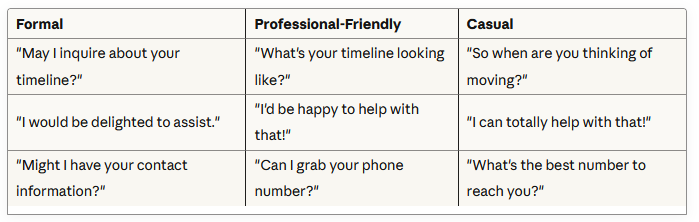
5. Formality Level
What it is: How casual vs. professional the language is
Why it matters: Should match your personal brand and target market
Your options:
Formal: "Good evening. How may I assist you today?" (suits luxury, corporate clients)
Professional-Friendly: "Hi there! How can I help you?" (most common—approachable but polished)
Casual: "Hey! What's up?" (works for younger agents targeting millennials/Gen Z)
Script examples:
PERSONALITY & BEHAVIOR SETTINGS
6. Conversational Style (Temperature)
What it is (in AI terms): Controls creativity and unpredictability
What it means for you: How "by the script" vs. "naturally conversational" the AI sounds
Your options:
Low Temperature (Strict/Consistent):
Sticks closely to the script, predictable responses, very consistent every call
Best for: High-stakes situations, legal compliance, consistent brandingMedium Temperature (Balanced):
Follows the script but adds natural variations, sounds more human
Best for: Most real estate calls—balance of control and naturalnessHigh Temperature (Creative/Adaptive):
More spontaneous, handles unexpected questions better, very conversational
Best for: Complex conversations, handling objections, building rapport
Real-world impact:
Low temp: "I see you're interested in 123 Main St. Let me ask—what's your timeline?"
High temp: "Oh, 123 Main St! Great choice, that's in a fantastic neighborhood. So, are you looking to move soon or just starting to explore?"
7. Assertiveness Level
What it is: How pushy vs. passive your AI is about getting information and booking appointments
Why it matters: Affects conversion rates and caller experience
Your options:
Passive: Takes "I'll think about it" as a final answer, doesn't push back on objections
Balanced: Politely persists, asks clarifying questions, offers alternatives
Assertive: Firmly guides the conversation, overcomes objections, pushes for the appointment
Example conversation:
Caller: "I'm not sure I'm ready to schedule a showing yet."
Passive AI: "That's totally fine! Give us a call when you're ready."
Balanced AI: "I understand. Can I ask what you'd like to know first before scheduling? Maybe I can help answer those questions now."
Assertive AI: "I hear you. But here's the thing—seeing it in person answers way more questions than photos ever could. How about this: let's book a quick 15-minute showing and if it's not a fit, no big deal. Does tomorrow at 5 work?"
8. Empathy & Emotional Intelligence
What it is: How well the AI picks up on and responds to caller emotions
Why it matters: Handles sensitive situations like divorces, downsizing, financial stress
Your options:
Standard Mode: Professional, friendly, sticks to business
High Empathy Mode: Recognizes emotional cues, adjusts tone, shows understanding
Example:
Caller: [sounds stressed] "We're selling because we just can't afford the house anymore..."
Standard AI: "Got it. What's your ideal timeline for selling?"
High Empathy AI: "I'm really sorry to hear that. That must be stressful. We'll do everything we can to help make this as smooth as possible for you. When would you ideally like to have this sold by?"
When to use High Empathy:
Divorce sales
Downsizing (death of spouse, empty nesters)
Financial hardship (foreclosure avoidance, short sales)
Relocation stress
KNOWLEDGE BASE CUSTOMIZATION
9. Your Business Information
What we program in:
Your name and how you like to be called ("Sarah" vs. "Ms. Mitchell")
Your brokerage name
Your specialties (first-time buyers, luxury, investment properties, etc.)
Areas you serve
Your unique selling proposition ("I've lived here 20 years and know every neighborhood")
Your availability and preferred meeting times
10. Market-Specific Knowledge
What we program in:
Local neighborhoods and their characteristics
School districts and ratings
Average home prices by area
Market trends (buyer's market vs. seller's market right now)
Common buyer questions about the area
Local amenities (parks, shopping, restaurants)
Example:
If someone asks about "good schools," your AI can say: "The property is in the Lincoln School District, which is rated 9/10. Lincoln Elementary just won the Blue Ribbon Award last year."
11. FAQ & Objection Responses
What we program in:
Your answers to the 20 most common questions you get
How you handle price objections
Your response to "I'm working with another agent"
Your process for showings, offers, negotiations
Financing options you recommend
Your availability and communication preferences
Custom examples:
"Do you charge a buyer's fee?" → Your specific answer
"What's your commission?" → Your standard response
"Can you lower your rate?" → Your objection handler
"How long does closing take?" → Your typical timeline
12. Qualifying Questions & Lead Scoring
What we program in:
Which questions to ask every caller
Which answers make someone a "hot lead" vs. "cold lead"
When to push for appointment vs. add to nurture list
Red flags to watch for (tire-kickers, non-serious callers)
Example custom rules:
If they say "pre-approved" → HOT LEAD, book showing ASAP
If they say "just looking" → COLD LEAD, capture info, add to drip campaign
If they mention another agent → Ask if they're under contract, then position yourself as backup
13. Integration & Workflow Rules
What we program in:
Which calendar to sync with (Google, Outlook, Calendly)
What times are off-limits for bookings
How long showing appointments should be (30 min? 60 min?)
What information to capture in your CRM
Who gets notified for hot leads (you, your assistant, your team)
Text vs. email notification preferences
CALL FLOW CUSTOMIZATION
14. Opening Script
What it is: The first 10 seconds of every call—critical for first impressions
Your options:
"Good [morning/afternoon], you've reached [Your Name] with [Brokerage]. This is Emma, [Your Name]'s assistant. How can I help you today?"
"Hi! Thanks for calling [Your Name]. I'm Emma, and I help [him/her] with scheduling and questions. What can I do for you?"
"Hey there! You've reached [Your Name]'s office. I'm Emma. Are you calling about a listing, or do you have questions about buying or selling?"
We customize based on:
Your branding
Your target demographic
Your personal preference
15. Qualification Depth
What it is: How many questions the AI asks before booking appointments
Your options:
Light Qualification (3-4 questions):
Just the basics—name, phone, what they're interested in, when they want to see it
Best for: Hot inbound leads who found your listingStandard Qualification (5-7 questions):
Basics + timeline, financing status, motivation
Best for: Most real estate calls—balances info gathering with not scaring them offDeep Qualification (8-10 questions):
Everything above + budget, decision-makers, must-haves vs. nice-to-haves, competing properties
Best for: High-volume agents who only want to meet with serious buyers
16. Appointment Booking Rules
What we customize:
Minimum notice required (same-day bookings allowed? or 24 hours minimum?)
Maximum appointments per day
Buffer time between showings
Automatic confirmation texts/emails
Reminder timing (24 hours before? 2 hours before?)
17. Transfer & Escalation Rules
What it is: When the AI should connect the caller directly to you
Custom triggers you can set:
Current client calling (always transfer)
Deal under contract (urgent, transfer immediately)
Caller is angry or upset (transfer with warning)
Question the AI can't answer (take detailed message vs. attempt transfer)
High-value lead asking complex questions (you decide threshold)
ADVANCED CUSTOMIZATION
18. Multilingual Support
What it is: AI can detect language and switch automatically
Your options:
English only (default)
English + Spanish
English + Spanish + Portuguese
Other languages available on request
How it works:
Caller starts in Spanish → AI responds in Spanish → All notes/emails to you are translated to English
19. Industry-Specific Terminology
What we program in:
How you refer to things (do you say "home" or "property"?)
Local slang (do you call it "the shore" or "the beach"?)
Your brokerage's specific terms
Compliance language required by your state
20. Seasonal & Campaign Adjustments
What we can change on-the-fly:
Open house scripts (temporary for specific events)
New listing announcements
Holiday greetings and hours
Market update messaging ("inventory is low right now, so...")
Special promotions or incentives

AI agents that work to promote your business 24/7
Contact
917-997-8598
agency@adrenaln5.com
Subscribe to our newsletter


© 2026 Adrenaln5.com All Rights Reserved
Industries
MedSpas
Dental Offices
Law Offices
Gyms
Real Estate
Restaurants
and more
Company
About Us
Careers